Write
the brief.
Get software.
ScodyX plans, writes, self-tests and repairs the build — then ships it to your own GitHub and hosting. One conversation, and readable evidence for every run.
- Intent-aware
- Verified workflow
- You keep the code
Your prompt is kept and starts the run as soon as you sign in.
Plan
9 steps · routing, data layer, checkout
Build
wrote src/routes/checkout.tsx
Self-test
14 modules transpiled · 0 errors
Pull request
scodyx/build-4f2a · PR #12
Deploy
netlify · streaming build log
- 1
- brief from idea to a working app
- 0
- setup steps before the first run
- 100%
- of the source code stays yours
Row-level isolation on every workspace record
Merchant-of-record billing with global tax handling
Autonomous self-test before a run is marked done
Bring your own GitHub and hosting accounts — you keep the keys
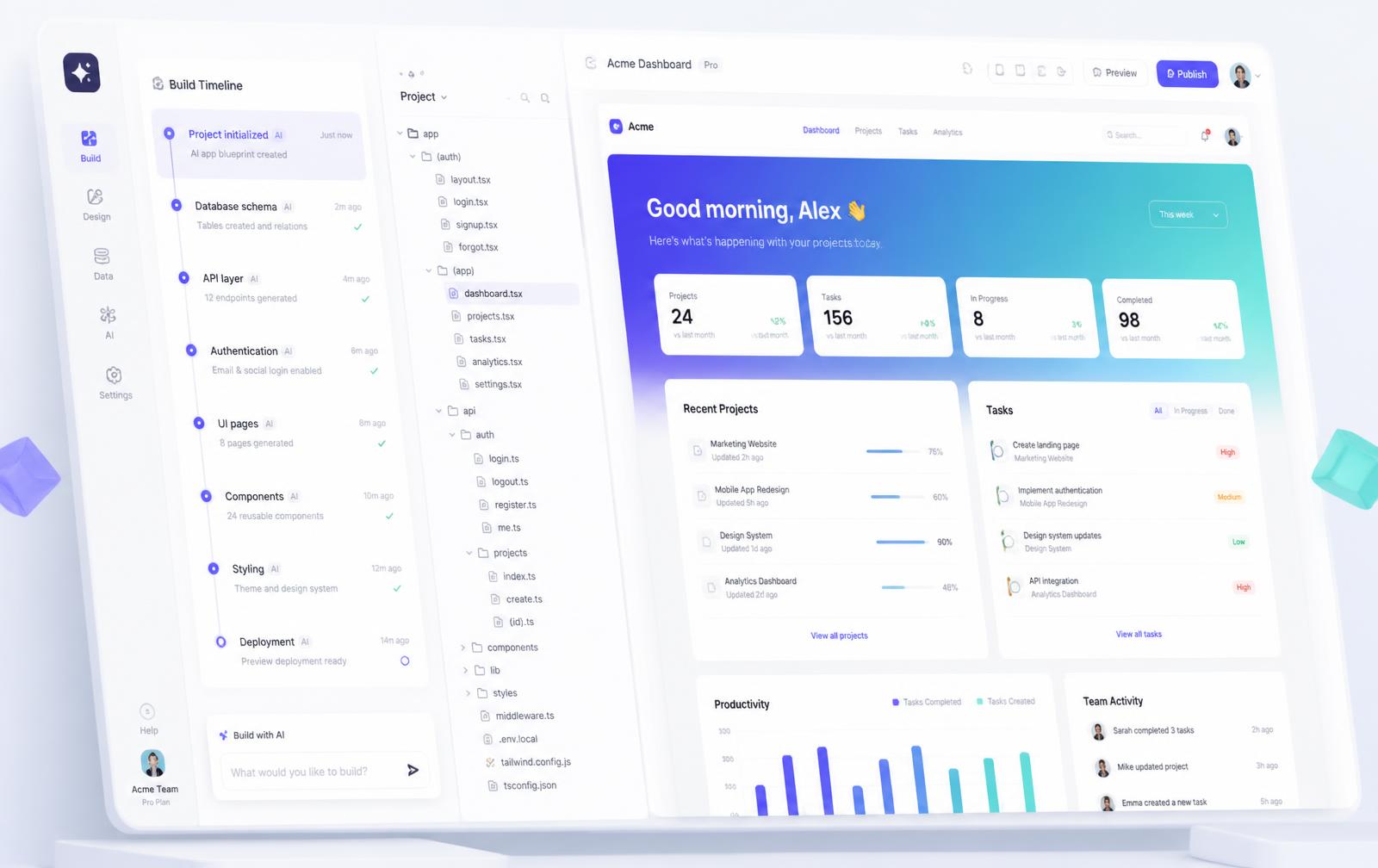
One surface for the whole run: the plan and every repair on the left, real files in the middle, the app itself booting in an isolated live preview on the right.
Take the tourA build pipeline you can actually read
Nothing happens off-screen. The plan is written before the first file, every repair is a numbered entry, and the whole run exports as JSON or a PDF report.
Describe the product
Write a sentence or paste a spec. ScodyX separates questions from requested changes and asks before making a material guess.
Watch the plan land
ScodyX drafts a build plan first — every step, file and check is written to a timeline you can read and export.
Self-test and repair
The bundle is transpiled and statically checked. Failures are repaired autonomously before the run is marked done.
Ship it
Export the project as a ZIP, or open a pull request on your own GitHub and deploy to the host you already use.
One request, one accountable workflow
ScodyX understands the outcome before it acts. Questions remain conversation, unclear changes pause for an explicit answer, and executable work moves through planning, implementation, verification and repair in one project history.
- 01Understand intent
- 02Plan the change
- 03Execute safely
- 04Verify the result
Everything a serious build needs, not just a chat box
Data, auth, version control, hosting, roles, quotas, analytics and audit trails are part of the platform — not add-ons you wire up afterwards.
Autonomous build loop
Plan → build → self-test → repair, on every prompt. Each phase is a timeline entry with the exact files it touched.
One intelligent interface
ScodyX understands the request, selects execution automatically and keeps implementation details out of your workspace.
Isolated live preview
Generated apps boot in a locked-down runtime with their own module registry and storage. No host access, no shared state.
Database & auth for your app
A real document store and email sign-in through the ScodyX bridge, so persistence and protected routes survive the final build.
Pull request per build
Every run can push a unique branch, a descriptive commit and a PR that links straight back to the saved timeline steps.
Deploy where you want
Connect your own GitHub, hosting and domain accounts. ScodyX prepares the build, the branch and the release notes; you keep the accounts.
Workspaces, seats and roles
Owner, admin and member roles with per-user project isolation, invitations and enforced access limits.
Activity analytics
Project activity with drill-downs and export, so changes remain accountable.
Records you can audit
Request references, invoice history and downloadable receipts remain available for reconciliation.
Audit log for everything
Generate, build, deploy, invite, role change — every action is recorded with actor, target and timestamp.
Template gallery
Ready-made starters — SaaS dashboard, storefront, CRM, LMS — cloned into your workspace in one click.
Secure sharing
View-only project links for clients, plus full exports as ZIP or PDF timeline reports for handover.
Begin from a working product
Each template arrives as real files you can edit, extend, export or open a pull request against — then prompt from there.
Built for more than one builder
Invite your team into a workspace with seats, roles and per-user project isolation. Share a project for review, leave comment threads on a build, or hand a client a view-only link that never exposes your credits or code history.
- Comment threads per project and per build run
- Presence and shared sessions on collaborative projects
- Organisation audit log with actor, action and target
- Export any timeline as JSON or a PDF report

Spend, access and history — all accountable
Limits are enforced on the server as well as in the interface, and every action lands in an audit log with actor, target and timestamp.
Plan-enforced limits
Seats, projects and private visibility are enforced in the UI and on the server.
Execution controls
Server-enforced limits and request history keep workspace activity accountable.
Role-based access
Owner, admin and member scopes on every project, invite and billing action.
Exportable evidence
CSV usage exports, JSON timelines, PDF reports and downloadable receipts.
The output belongs to you
See how it worksEvery project exports as a ZIP or lands in your own GitHub repository, and runs on hosting you control. Plain, portable source you can take anywhere.
Answered plainly
- How does ScodyX handle a request?
- ScodyX first determines whether you are asking a question or requesting work. It asks when a material detail is missing, then plans, executes, verifies and repairs through one accountable workflow.
- How do I get started?
- Create an account, describe what you want in your own words, and ScodyX takes it from brief to a working, verified app.
- Do generated apps really have a backend?
- Yes. Generated apps can import the ScodyX bridge for a document store and email sign-in, both backed by real tables scoped to your project — not mocked local state.
- Can my team work in the same project?
- Workspaces carry seats and roles. Members get isolated projects by default, admins can promote, restrict and audit, and shared projects show presence and comment threads.
- Who owns the output?
- You do. Every project exports as a ZIP or lands in your own GitHub repository, and the generated code is plain, portable source you can run anywhere.
Your next product is one sentence away
Bring your own repository and hosting whenever you are ready to take it live.
What is evidenced, and what is only alignment
Evidenced items are produced by checks that run against the live system and can be exported. Alignment-only items describe how our practices map to a published standard — they are not certifications, audits or attestations by any third party.
- Tenant isolation
- Row-level security tests run against the live database and are reported in your workspace assurance page.
- Audit trail & credit ledger
- Every run, deploy and credit movement is recorded with a timestamp and request ID you can export.
- Encryption in transit
- HTTPS/TLS is enforced on all platform and generated-app endpoints, and probed on demand.
- ISO/IEC 27001 & 27701
- Our controls are mapped to these standards. We are not certified by an accredited body, and we do not claim to be.
- SOC 2 Trust Services Criteria
- Practices mapped to the criteria. No SOC 2 report has been issued for ScodyX.
- WCAG 2.2 AA
- We build to the guidelines and test key flows. No independent accessibility audit yet.
Full control register and framework mappings: Compliance & standards · Security overview